20 Arduino Final Year Projects for ECE, Electrical and Computer Engineering Students (and How to Get the Source Code)
20 Arduino Uno final year project ideas for Nigerian engineering students, with a parts-list checklist, and how to get the program, wiring diagrams and Wokwi files.

Quick answer
Good Arduino final year projects for Nigerian engineering students include an automatic parking sensor, temperature and humidity monitor, smart door lock with keypad, automatic street light, soil moisture monitor and water tank level indicator. All run on an Arduino Uno with common sensors. To get the program, parts list, wiring diagrams, Wokwi simulator files and a guide for your topic, type it at code.monoed.africa, review the plan for free, and pay ₦13,500 once you approve it. You buy the parts and build the circuit yourself.
20 Arduino Final Year Projects for ECE, Electrical and Computer Engineering Students (and How to Get the Source Code)
If you study Electrical and Electronics, Computer Engineering or Electronic and Computer Engineering, your department may expect a project with hardware, not just a web system. Arduino is the most common way to do that. It is cheap, well documented, and most supervisors know it.
This post gives you 20 Arduino Uno project ideas, explains what a panel expects from a hardware project, and shows you how to get the code, parts list and wiring diagrams.
Why Arduino for a final year project
- Low cost. An Uno and a few sensors cost far less than most project budgets.
- Easy to program. The code is C++ with plenty of libraries, so you can focus on the system.
- Easy to explain. Inputs (sensors), a controller (the Uno) and outputs (display, buzzer, motor) make a clear block diagram.
- Widely accepted. Departments across Nigerian universities and polytechnics approve Arduino projects for ND, HND and BSc.
What panels expect from a hardware project
- A block diagram and circuit diagram that match what you built.
- A parts list with a reason for each part. Why this sensor? Why this resistor value?
- Code you can explain line by line. Expect questions on what each function does.
- A working demo. Power on, trigger the sensor, show the output.
- Testing. Show how you tested it, what readings you got and how you handled errors.
- Cost and limitations. What did it cost, and what can't it do?
If your hardware fails on defence day, a simulation can save you. Wokwi is a free online Arduino simulator, and many students show the circuit running there as a backup.
20 Arduino final year project ideas
Home and security
1. Smart door lock with keypad
Enter a code on a keypad to unlock a servo-driven latch. A buzzer sounds after three wrong attempts.
2. Intruder alarm with motion sensor
A PIR sensor detects movement and triggers a buzzer and LED.
3. Fire and smoke alert system
A smoke sensor raises an alarm when the reading goes above a set level.
4. Gas leak detector
A gas sensor triggers a buzzer and LCD warning when gas levels are high.
5. Automatic light control using a light sensor
An LDR switches an LED lamp on at dusk and off at dawn.
Monitoring and display
6. Temperature and humidity monitor with LCD
Reads a DHT sensor and shows the values on an LCD, with a warning if limits are exceeded.
7. Water tank level indicator
An ultrasonic sensor measures water level and shows it on an LCD, with an alert at low and full levels.
8. Soil moisture monitor for farms or gardens
A soil moisture sensor shows whether the soil is dry, moist or wet.
9. Room occupancy counter
Two sensors at a doorway count people entering and leaving and display the total.
10. Digital clock with alarm
Shows time and date on an LCD and sounds an alarm at a set time.
Safety and transport
11. Ultrasonic car parking assistant
Measures the distance to an obstacle and beeps faster as it gets closer.
12. Alcohol detection system for drivers
An alcohol sensor triggers a warning when the reading is above a threshold. Use it as a demonstration of the concept, not as a legal test.
13. Automatic traffic light controller
Controls a four-way junction with timed LED lights and a pedestrian button.
14. Speed measurement using two sensors
Measures the time an object takes to pass two points and calculates speed.
15. Vehicle seat belt reminder
A switch input triggers a buzzer if the seat belt is not fastened.
Health and utility
16. Heart rate monitor with display
A pulse sensor shows beats per minute on an LCD. Include a note that it is not a medical device.
17. Automatic hand sanitiser dispenser
An IR or ultrasonic sensor detects a hand and moves a servo to dispense.
18. Medication reminder box
Sounds an alarm and lights an LED at set times to remind the user to take medicine.
Learning and general
19. Electronic voting machine (demonstration model)
Buttons for candidates, an LCD for results, and a lock to prevent double voting. Keep the scope to a class or departmental election.
20. Digital thermometer with alert levels
A temperature sensor shows readings and changes LED colour for normal, warm and high.
For more engineering ideas, see our lists of final year project ideas for civil engineering and mechanical engineering students.
Some popular topics have limits
Many students search for projects that use GSM (SMS alerts), Wi-Fi (IoT dashboards), fingerprint sensors, robots or mains-voltage switching. These need extra modules, more complexity and, for mains voltage, real safety risks.
The ideas above are chosen to work on an Arduino Uno with common sensors and low-voltage parts. If your supervisor requires GSM or Wi-Fi, check what your project can include before you commit to a topic.
How to pick an Arduino project
- Ask your supervisor first. Some departments require a certain level of complexity, or specific components.
- Choose something you can demo in three minutes. Power on, trigger the sensor, show the result.
- Check that you can buy the parts. Look at local electronics markets and online stores in Nigeria before you commit. Some sensors are harder to find.
- Keep it low voltage. Avoid anything that switches mains power unless you have supervision and proper safety measures.
- Add one feature that is yours. A second sensor, an LCD message or a log of readings makes the project more original.
How to get the source code
Option 1: Get it from MonoEd's Project Source Code tool
MonoEd's Project Source Code tool supports Arduino and microcontroller projects for the Arduino Uno.
- Type your topic. For example, "Automatic Water Tank Level Indicator".
- Review the plan. You see what the project will do before you pay. Planning is free.
- Approve the plan and pay ₦13,500 once. You only pay after you approve it. A developer typically charges ₦40,000 to ₦50,000.
- Receive your project. Most projects are ready 10 to 40 minutes after payment.
What you receive for an Arduino project:
- The Arduino program (C++)
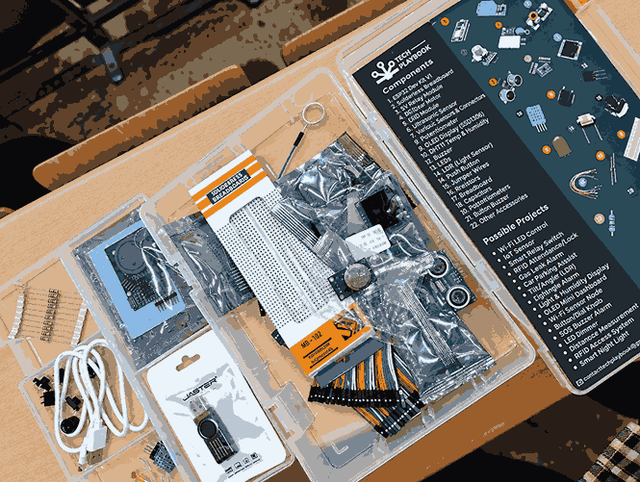
- A parts list
- Wiring diagrams
- Files for the Wokwi simulator, so you can test the circuit without hardware
- A guide to the system
- About 20 likely defence questions with answers
You buy the parts and build the circuit yourself. Each project also includes Windows run instructions, three change requests after delivery and help over WhatsApp.
Get the code and wiring diagrams for your Arduino project →
Option 2: Build it yourself
Learn the Arduino basics (digital and analogue inputs, serial monitor, libraries), then build your circuit in Wokwi before you touch hardware. Add one sensor at a time and test as you go. Expect a few weeks, and plan time for your block diagram, circuit diagram and report.
Option 3: Use free code and tutorials
Many Arduino projects are shared on GitHub and in video tutorials. Before you use one, check that it uses the same board and sensors you can buy, that the wiring is explained, and that you understand each line. See our free source code checklist.
After you have the code: finish the project
A hardware project still needs a written report and a defence.
- Write the report. Use your circuit diagram, parts list and test results for Chapter 3 and Chapter 4. MonoEd's FYP Generator drafts Chapters 1 to 5 with real published sources, fixes supervisor corrections and exports to Word and defence slides. For Arduino projects from MonoEd's source code store, it can base Chapters 3 and 4 on your system's design, screenshots and test results. It never invents results, so you enter your own test readings. Chapters 1 and 2 of your first project are free.
- Prepare for the panel. See our final year project defence questions and answers and defence PowerPoint guide.
Frequently Asked Questions (FAQs)
What is the best Arduino project for a final year student in Nigeria?
A project with a clear problem and a simple demo, such as a water tank level indicator, smart door lock, parking assistant or temperature monitor. Choose one where you can explain every component and test it in front of the panel.
How can I get Arduino final year project source code?
You can build it yourself, use free code from GitHub and tutorials, or get a project built for your topic from MonoEd's Project Source Code tool at code.monoed.africa. Type your topic, review the plan for free, and pay ₦13,500 only after you approve it.
What do I get with an Arduino project from MonoEd?
The Arduino program, a parts list, wiring diagrams, files for the Wokwi simulator and a guide to the system, plus about 20 likely defence questions with answers, three change requests and help over WhatsApp.
Do I have to buy the components myself?
Yes. MonoEd provides the code, parts list and wiring diagrams. You buy the parts and build the circuit.
Can I test the project without hardware?
Yes. The Wokwi simulator files let you run the circuit online before you buy parts, and you can show the simulation as a backup at your defence.
Which Arduino board does the tool support?
The Arduino Uno.
Can I get a project that uses GSM, Wi-Fi, a fingerprint sensor or a robot?
No. The Project Source Code tool does not build hardware that uses Wi-Fi, GSM, fingerprint sensors, robots or mains voltage. Choose a topic that uses common sensors and low-voltage parts, such as those in this list.
Is it okay to use ready-made code for a hardware project?
Follow your school's rules. Many students use a working program as a base, then understand it fully, test it themselves and present it as their own work. You must be able to explain the circuit and the code at your defence.
How much does an Arduino final year project cost in Nigeria?
Developers commonly charge ₦40,000 to ₦50,000 or more for the code and documentation. MonoEd's Project Source Code tool costs ₦13,500, paid once and only after you approve the plan, plus the cost of the parts you buy.
Can I get a project for my own topic, not one from this list?
Yes. The list is only for ideas. Type any computing or engineering project topic at code.monoed.africa and you will see a plan for it before you pay.
Can I use this for HND and ND projects, not just BSc?
Yes. The tool is for computing and engineering students at universities and polytechnics, across BSc, HND and ND.
Who writes my project report (Chapters 1 to 5)?
The Project Source Code tool gives you the program, diagrams and guide but does not write your chapters. Use MonoEd's FYP Generator for that. It drafts Chapters 1 to 5 with real sources and never invents results. Chapters 1 and 2 of your first project are free.
About the Author
Mohammad-Jamiu B. Balogun, GMNSE
AI Security Researcher · Founder, MonoEd Africa
Mohammad-Jamiu is a First-Class Telecommunications Engineer and Best Graduating Student, BUK '24, and an AI security researcher. He founded MonoEd Africa to give Nigerian students AI-powered academic tools — from SIWES logbooks to final year projects. His work has reached over 10,000 students across Nigeria.