Already Wrote Chapters 1 and 2? How to Finish Your Final Year Project From Chapter 3 (2027)
Already wrote Chapters 1 and 2? Check them first, fix your references, then continue to Chapter 3 without starting again. Step by step, on your phone.
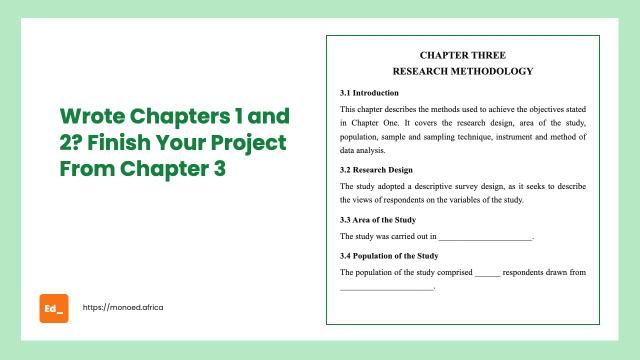
Many students get Chapters 1 and 2 approved, then stall at Chapter 3. Methodology feels like a different subject, and Chapter 4 needs real data. This guide shows you how to carry on from where you stopped, without rewriting what your supervisor has already seen.
First, check your Chapter 1
Chapter 3 is built on Chapter 1. If Chapter 1 is unclear, Chapter 3 will be too. Before you go on, find these in your Chapter 1 and make sure they are written plainly:
- Your objectives. Usually three to five, each starting with a verb: to examine, to assess, to determine.
- Your research questions, one for each objective.
- Your hypotheses, only if your department uses them. If your Chapter 1 has none, don't add any in Chapter 3. A supervisor will notice hypotheses that appear from nowhere.
- Your study area and who you are studying. For example, "staff of microfinance banks in Enugu Metropolis".
- Your scope. The place, the people and the period your study covers.
If something is missing, fix it in Chapter 1 first. It saves you a correction later.
Then, check your references
This is where most uploaded chapters have problems, especially when part of the work was done with ChatGPT or copied from an old project.
- Every source cited in your text must be in your reference list. If you wrote "(Okafor, 2019)" in Chapter 2, Okafor 2019 must appear in your references.
- The years must match. "(Bello, 2018)" in your text and "Bello (2020)" in your list is a common mistake.
- Every reference should be a real paper or book. Search the title on Google Scholar. If you can't find it anywhere, your supervisor won't either. Replace it with a real source that says the same thing.
- Use one citation style all through. APA is the most common in Nigerian departments, but follow your department's guide.
What Chapter 3 needs from your first two chapters
Chapter 3 explains how you will answer your research questions. Each part links back to something you already wrote:
| Chapter 3 section | Comes from |
|---|---|
| Research design | Your objectives: are you describing, comparing or testing a relationship? |
| Area of the study | The study area in your Chapter 1 |
| Population and sample | Who you said you are studying |
| Instrument | Your research questions: each one needs items that answer it |
| Method of data analysis | Your research questions, and your hypotheses if you have them |
If your Chapter 3 introduces a new place, a new group of people or a new objective, it no longer matches Chapter 1. Keep them consistent.
How to continue on MonoEd FYP
You can do all of this on your phone.
Step 1: Upload your Word file
Go to fyp.monoed.africa and tap Start free. On the Project Details page, look for Already wrote Chapter 1 (and 2)? and tap Continue from my chapters. Upload your Word file (.docx) with Chapter 1, or Chapters 1 and 2, and the headings CHAPTER ONE and CHAPTER TWO in it.
PDFs and scanned pages can't be read yet. If your file is a PDF, open it in Word and save it as .docx.
Step 2: Check what MonoEd read
You'll see your topic, your objectives, your study area and who you are studying, taken from your Chapter 1. Fix the topic if it isn't right. This is what Chapters 3 to 5 will follow, so it's worth a careful look.
Step 3: Check your references
Each entry in your reference list is looked up as a real published paper. You'll see how many were found, and a card for each one that wasn't, with the sentence where you cite it.
For each one you choose:
- Keep it if it's a book, a government report or a source you have in hand. Many Nigerian textbooks and reports are not online, and that's fine.
- Remove if you no longer need it.
- Swap for a real paper to see real published papers on the same point. Pick one that supports what you wrote, and every place your chapter cites the old reference will cite the new paper instead.
You'll also see a short list of things worth fixing in your Word file, such as sources cited in your text but missing from your list.
Step 4: Fill in your details and continue
Add your school, name and matric number for the title page. MonoEd FYP then finds more real papers for your later chapters, keeping yours.
Your Chapters 1 and 2 stay exactly as you wrote them. Chapter 3 follows your own objectives and study area, cites your references in the same citation style, and Chapter 4 is built from the data you collect. If you uploaded Chapter 1 only, MonoEd FYP writes Chapter 2 for you first.
Common problems and how to fix them
"We couldn't find CHAPTER ONE in this file." Your file needs the chapter headings. Add CHAPTER ONE (and CHAPTER TWO) as headings in Word and upload again.
Many references not found. Check them one by one on Google Scholar. If a reference was made up by an AI tool, it won't exist anywhere: swap it or remove it. Books and reports are often not online; keep those.
A year doesn't match. Open your Word file, find the citation and correct the year so the text and the list agree.
Your supervisor changed Chapter 1 after you uploaded. Make the change in your Word file, then use Supervisor Fix Mode on your project to update the chapter.
Frequently Asked Questions
Will MonoEd change my Chapters 1 and 2?
No. They are kept word for word. Only the headings are put in your project's format.
Can I upload only Chapter 1?
Yes. MonoEd FYP keeps your Chapter 1 and writes Chapter 2 for you, then continues to Chapter 3.
Can I upload a PDF?
Not yet. Save your file as .docx in Word and upload that.
Will my citation style change?
No. MonoEd FYP detects the style you used, such as APA or IEEE, and Chapters 3 to 5 follow it. You can still switch styles later, and your citations change with it.
What if my reference is a textbook that isn't online?
Keep it. Books and reports are often not online, and your supervisor knows that. The check is mainly to catch references that don't exist at all.
Do I pay to continue from Chapter 3?
Chapters 3 to 5, corrections, the Word download and defence prep come with a one-time unlock per project. Reading your uploaded chapters and checking your references is free.
About the Author
Mohammad-Jamiu B. Balogun, GMNSE
Founder & Product Architect, MonoEd Africa
Mohammad-Jamiu is a First-Class Telecommunications Engineer and Best Graduating Student of Bayero University, Kano (Class of 2024), and the founder of MonoEd Africa. An AI engineer and product architect, he designs and builds MonoEd's guided workflows for SIWES logbooks and reports, final year projects and academic tools such as the GPA calculator, helping students produce better work and build the skills the AI era demands. MonoEd's tools have reached more than 20,000 students across Nigeria.