How to Practise IELTS Writing on a Computer Before Test Day
Prepare for IELTS Writing on a computer with a practical routine for planning, typing, editing, and reviewing your essays before test day.

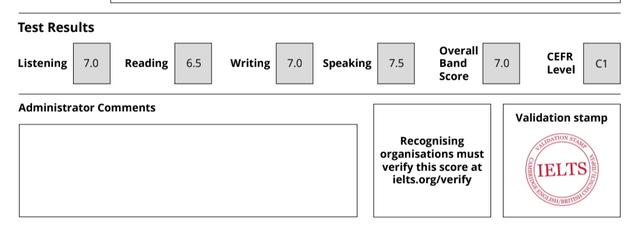
Before taking IELTS on a computer, I knew I needed to practise writing essays.
However, writing an essay and writing one on a screen under time pressure are slightly different experiences.
You need to organise your ideas, type clearly, watch the time, and edit without losing your place.
During my actual test, I found typing easier than handwriting. I could edit sentences and keep track of my word count more comfortably.
I eventually achieved Band 7.0 in Writing.
That does not mean the computer format automatically improves your score. But becoming comfortable with typing and editing can remove an unnecessary source of stress.
Here is how I would practise before test day.
Quick Summary: A Computer Writing Practice Routine
For each practice session:
- Choose a suitable IELTS question.
- Use a computer and keyboard.
- Turn off writing assistance where possible.
- Set a timer.
- Plan before typing your answer.
- Leave time to check your work.
- Review the essay after the timer ends.
- Revise a weak section before moving on.
Use official familiarisation materials to learn the actual test interface. Use your regular practice sessions to improve the writing itself.
💡 You may like to read: My IELTS Computer Based Test Experience in Nigeria: What Really Happens on Exam Day
1. Practise With a Computer and Keyboard
Your phone is useful for reading advice, listening practice, and recording Speaking answers.
For computer-based Writing preparation, arrange regular opportunities to use a computer.
Typing with a keyboard feels different from composing a message on your phone.
Practise:
- Typing complete paragraphs.
- Moving the cursor to correct a sentence.
- Selecting and replacing text.
- Adding a missing word.
- Reading your answer on screen.
- Checking punctuation and paragraph breaks.
You do not need to become an exceptionally fast typist.
Your aim is to type comfortably enough that you can concentrate on your answer.
If finding letters on the keyboard takes most of your attention, include some short typing sessions alongside your IELTS practice.
2. Learn the Actual Test Interface Separately
A document editor or practice website can help you develop writing habits, but its controls may differ from those in the IELTS test.
Use the familiarisation resources linked through the official IELTS preparation pages to explore the format you have booked.
Read the instructions and try the available controls.
Do not assume that every feature in your usual writing app will be available during the exam.
The purpose of familiarisation is to reduce uncertainty, so you can focus on your response when the test begins.
3. Avoid Depending on Writing Assistance
When practising in a document editor, check whether it is helping you automatically.
Features such as autocorrect, predictive text, grammar suggestions, and spelling corrections can hide mistakes you need to notice yourself.
For timed practice, turn those features off where possible.
After the session, you can use feedback tools to help review your work.
Keeping these stages separate makes it easier to understand what you can currently produce independently and what you still need to practise.
4. Choose One Clear Goal for the Session
Not every practice session needs to be a complete Writing test.
You might focus on:
- Planning a Task 2 response.
- Writing a clear Academic Task 1 overview.
- Developing one body paragraph.
- Finishing an essay within your planned time.
- Editing sentences without rewriting the whole response.
For example, if you often run out of ideas halfway through a paragraph, faster typing will not solve the main problem.
You may need more planning and idea-development practice.
Choose the exercise that matches the difficulty you are experiencing.
5. Plan Before Typing the Essay
A blank screen can make it tempting to start immediately.
However, a short plan can save you from writing a paragraph that does not answer the question.
For Task 2, identify:
- What the question asks.
- Your position, where required.
- The main purpose of each body paragraph.
- How you will explain and support your points.
Your plan can be brief.
For example:
Question: Should employers allow people to work from home?
Position: Support flexibility where the work is suitable.
First point: Less commuting can save time.
Second point: Some work still benefits from face-to-face collaboration.
This gives you a direction before you begin writing full sentences.
6. Practise a Timing Routine
For IELTS Academic Writing, the official guidance recommends about 20 minutes for Task 1 and 40 minutes for Task 2. The minimum lengths are 150 and 250 words respectively, and Task 2 contributes twice as much to the Writing score. Official IELTS Writing format.
For a Task 2 practice session, you could try:
| Stage | Example allocation |
|---|---|
| Understand the question and plan | 5 minutes |
| Write the response | 30 minutes |
| Check and correct | 5 minutes |
This is a suggested practice routine, not a required division.
Adjust it based on what you learn from your sessions.
If you regularly need more planning time, practise making focused plans separately. If you struggle to finish, examine whether your paragraphs are too long or whether you keep rewriting earlier sentences.
7. Write Forward Without Ignoring Obvious Errors
One habit that can slow you down is stopping after every sentence to search for better vocabulary.
You write a sentence.
You replace two words.
You change them back.
Then you realise several minutes have passed.
During the main writing stage, focus on completing your argument.
Correct an obvious mistake when it is quick to fix, but avoid repeatedly polishing an opening while the rest of the essay remains unwritten.
If you cannot remember a particular word, try expressing the idea with language you can use accurately.
💡 You may like to read: How to Score Band 7+ in IELTS Writing
8. Practise Editing Without Creating New Problems
Editing on a computer is convenient, but rushed changes can introduce errors.
Consider this sentence:
Online courses allows students to study from home.
You correct it to:
Online courses allow students to study from home.
That is a useful change.
But if you replace the whole subject, you need to check the sentence again:
An online course allow students to study from home.
The verb now needs another correction.
Whenever you change part of a sentence, reread the whole sentence.
Check:
- Does the subject still match the verb?
- Have I accidentally repeated or deleted a word?
- Is the punctuation still correct?
- Does the sentence still express my intended meaning?
Small checks matter when moving text around on screen.
9. Use Word Count as a Check
During practice, notice whether you can develop a complete answer of sufficient length within the time available.
If your response is too short, ask what is missing.
Have you explained your main points?
Have you addressed every instruction?
Does your example need more context?
If your answer becomes very long, check for repetition and material that does not help answer the question.
Adding sentences only to increase the total will not necessarily improve the response.
10. Review After the Timer Ends
Timed practice tells you what you can produce within a limit.
The review helps you decide what to change next time.
Save the original response before revising it.
Then identify:
- A part of the question you overlooked.
- A paragraph that needs clearer development.
- Sentences that are difficult to follow.
- Vocabulary you used inaccurately.
- Grammar mistakes that keep appearing.
- Places where you lost time.
Separate writing difficulties from computer difficulties.
For example:
“I could not explain my second point” needs a different exercise from “I accidentally deleted a sentence and struggled to recover my place.”
Practise Task 2 Writing With MyBandPrep
Since taking IELTS, I’ve built MyBandPrep to help candidates write and review Task 2 essays.
You can type your response, use an optional timer, and receive feedback highlighting sentences to improve. After revising, you can check the essay again.
Practise IELTS Task 2 writing on your computer
The band scores are AI-generated practice estimates, not official IELTS results.
Use MyBandPrep for writing practice and feedback, alongside official familiarisation materials for learning the test interface.
A Simple Practice Session to Try
Choose one Task 2 question and follow this sequence:
- Read the question and identify every instruction.
- Make a brief plan.
- Write your essay with writing assistance turned off where possible.
- Check your response before the timer finishes.
- Save the original version.
- Review the main weaknesses.
- Rewrite one paragraph.
- Record one priority for your next session.
Repeat the process with a fresh question to see whether you can apply what you learned independently.
Conclusion
Practising IELTS Writing on a computer involves more than learning to type quickly.
You need to plan, develop your answer, manage time, and make careful corrections.
For me, typing and editing felt comfortable during the test because I had practised on a computer beforehand.
Give yourself opportunities to build that familiarity before exam day, then use each practice response to improve the writing behind the typing.
FAQs
Do I need to type very fast for IELTS Writing on a computer?
You need to type comfortably enough to complete your responses within the available time. Practise with timed questions to find out whether typing speed is a problem or whether planning and idea development take more of your time.
Can I practise IELTS Writing in a document editor?
Yes. A document editor can help with typing, paragraphing, and timed practice. Turn off writing assistance where possible, and use official familiarisation resources separately to learn the test interface.
Should I practise on my phone?
A phone can support some preparation activities, but it does not reproduce typing with a computer keyboard. Include computer practice if you have booked that format.
How should I divide my time for Task 2?
One practice option is five minutes for planning, thirty for writing, and five for checking. Adjust this routine to suit your needs while keeping within the overall time available.
Should I correct mistakes while typing or wait until the end?
Fix obvious errors when doing so is quick. Avoid repeatedly rewriting earlier sentences while your response is unfinished. Leave some time at the end to reread and check your answer.
Is MyBandPrep an exact copy of the IELTS computer interface?
No. It provides a writing workspace, an optional timer, and feedback for Task 2 practice. Use official IELTS familiarisation materials to learn the actual test interface.
About the Author
Mohammad-Jamiu B. Balogun, GMNSE
AI Security Researcher · Founder, MonoEd Africa
Mohammad-Jamiu is a First-Class Telecommunications Engineer and Best Graduating Student, BUK '24, and an AI security researcher. He founded MonoEd Africa to give Nigerian students AI-powered academic tools — from SIWES logbooks to final year projects. His work has reached over 10,000 students across Nigeria.