How to Fill Your IT Logbook as a Polytechnic Student (With Examples)
How ND and HND students fill the IT logbook: what to write each day, weekly summaries, supervisor signatures, and sample entries for common polytechnic courses.

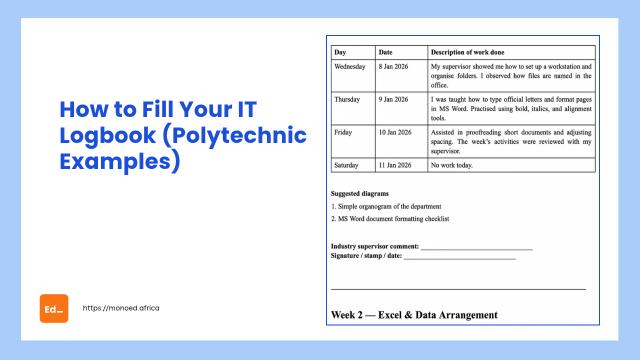
Quick summary:
Fill your IT logbook every working day with three things: the task you did, the tools or equipment you used, and what you learned. At the end of each week, write a short summary and ask your industry supervisor to sign. Use the past tense, keep each day to a few clear lines, and add a simple diagram where your logbook has space for one. For the one-year IT after ND, the logbook covers about 50 weeks, so falling behind is the biggest risk.
Whether your polytechnic calls it SIWES or IT, the logbook works the same way. It is the daily record of your industrial training, and your school supervisor, your industry supervisor and later your report all depend on it.
This guide shows what to write, with sample entries for common ND and HND courses. Your logbook's own instructions come first: some have a page per day, others a page per week.
What a logbook page usually has
Most IT logbooks have:
- Daily spaces (Monday to Friday, sometimes Saturday) for what you did each day
- A weekly summary or "project/job for the week" space
- A diagram or sketch space
- Signature and stamp spaces for your industry supervisor, and sometimes your school supervisor
What to write each day
Keep each day to 2 to 4 clear lines. A good entry answers:
- What did I do? The task, in the past tense.
- With what? The tools, equipment, software or forms.
- What did I learn? One line on the skill or lesson.
Weak: "Worked in the office."
Better: "Entered 40 supplier invoices into the accounting software and matched them against purchase orders. Learned how the company checks invoices before payment."
If nothing happened on a day (public holiday, no power, supervisor away), say so honestly. See what to write when no work was done.
Sample entries by course
ND Computer Science (IT unit of a company)
Monday: Set up three new staff laptops: installed Windows updates, Microsoft Office and the company's antivirus.
Tuesday: Crimped and tested 10 Ethernet cables for the new office extension using a crimping tool and LAN tester.
Wednesday: Helped my supervisor configure a Wi-Fi access point and assign static IP addresses to two printers.
Thursday: Fixed a staff laptop that would not boot by repairing the startup with a Windows recovery drive.
Friday: Updated the inventory sheet of computers and accessories in Excel. Learned how the company tags its assets.
See also a filled logbook for Computer Science.
ND or HND Accountancy (accounts office or audit firm)
Monday: Posted the week's cash receipts into the cash book and balanced it with my supervisor.
Tuesday: Prepared a bank reconciliation statement for the month of March.
Wednesday: Vouched expense receipts against the petty cash book during an audit.
Thursday: Calculated PAYE deductions for 12 staff using the payroll template.
Friday: Filed the week's documents and learned how the firm keeps working papers for each client.
See also how to fill your logbook as an accounting student.
ND Electrical/Electronic Engineering (installation company)
Monday: Observed safety briefing on site. Identified PVC, armoured and flexible cables and where each is used.
Tuesday: Fixed conduit pipes for surface wiring in a two-bedroom flat.
Wednesday: Pulled cables through conduits and terminated them at the sockets and switches.
Thursday: Installed a 6-way distribution board and connected the circuit breakers.
Friday: Carried out a continuity and insulation resistance test with a megger and recorded the readings.
See also the electrical engineering logbook guide.
ND Business Administration or OTM (office placement)
Monday: Received and recorded incoming letters in the correspondence register.
Tuesday: Typed and formatted two internal memos in Microsoft Word using the company's template.
Wednesday: Took minutes at the weekly department meeting and drafted them for my supervisor.
Thursday: Filed staff documents and updated the leave schedule in Excel.
Friday: Attended to visitors at the front desk and booked appointments in the visitors' book.
See also the business administration logbook guide.
The weekly summary
Write 3 to 5 sentences that tie the week together: the main job, what you learned, and any problem you solved. For example:
"This week I worked on the office network extension. I made and tested Ethernet cables, set up a Wi-Fi access point and assigned printer IP addresses. I learned how static and dynamic IP addresses are used in a small office."
Diagrams
Draw something you actually used or built: a circuit, a network layout, a flowchart of a process, a ledger format. Label it clearly. A simple, neat diagram is better than a copied complicated one.
Getting it signed
- Ask your supervisor to sign weekly, or whenever your school says. Do not collect 20 weeks of signatures at the end.
- Ask for the company stamp if your logbook has a stamp space.
- Keep the logbook clean and safe. Take a photo of each completed page in case it gets lost or damaged.
Tips for the one-year IT
The year after ND is long. These habits help:
- Write daily, even briefly. You can tidy the wording at the end of the week, but you cannot remember March in November.
- Show progress. Early weeks can be about learning tools; later weeks should show bigger jobs you did yourself. This also helps your report, which describes the year in stages. See how to write an IT report.
- Note names and terms. The name of the software, the model of the machine, the form you filled. These details make entries believable.
Using the MonoEd logbook tool
The MonoEd SIWES Logbook turns a short summary of your week into Monday to Friday entries you can edit. You can save each day's work by voice or text as it happens, get diagram ideas, and download your logbook as a PDF. Use it as a draft: copy the entries into your logbook in your own handwriting, and change anything that is not exactly what you did.
Frequently asked questions
Is the IT logbook different from the SIWES logbook?
The layout is usually the same, and many polytechnics use the same ITF-style logbook for both. Your school may issue a different one for the one-year IT, so ask your IT unit.
Can I fill my logbook in pencil?
Use a blue or black pen. Pencil can rub off and looks unofficial.
What if I started on a Wednesday?
Start your first week on the day you resumed. See how to fill your logbook if you started mid-week.
Should I write the same thing every day if my work repeats?
No. Even routine work changes a little: a different machine, a different fault, a different client. Write what was different that day.
About the Author
Mohammad-Jamiu B. Balogun, GMNSE
Founder & Product Architect, MonoEd Africa
Mohammad-Jamiu is a First-Class Telecommunications Engineer and Best Graduating Student of Bayero University, Kano (Class of 2024), and the founder of MonoEd Africa. An AI engineer and product architect, he designs and builds MonoEd's guided workflows for SIWES logbooks and reports, final year projects and academic tools such as the GPA calculator, helping students produce better work and build the skills the AI era demands. MonoEd's tools have reached more than 10,000 students across Nigeria.